









































































































*** DEPLOYMENT OF THE NOTIFICATION CENTER HAS BEEN POSTPONED TO FEBRUARY 11TH"
On February 11th, Act! will deliver reminders and system updates in a more modern, streamlined way with the launch of the Notification Center—your new home for alarms, alerts, and in-product updates.
For years, Act! alarms have appeared as separate pop‑up windows that could interrupt your workflow. With the Notification Center, those reminders will move to a centralized, always-available space inside the product, making them easier to access and manage without breaking your focus.
A Central Hub for Everything You Need to Know
When released, you’ll find the Notification Center in the top navigation bar, accessible through a new bell icon. When new updates or reminders arrive, the bell displays a notification count so you always know when something needs your attention.
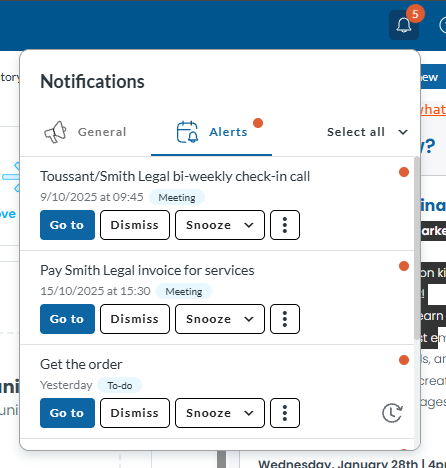
Inside, notifications are organized into two clear tabs:
General
Stay informed about background system updates—like import completions—so you always know when key processes have finished. In the future, this feature will alert you to a wider list of system notifications, such as system updates, new and modified features, and the like.
Alerts
Your familiar activity alarms will appear directly inside Act!. From here, you can:
- Open the related activity
- Snooze the reminder
- Dismiss the alert
- Reschedule for a better time
Visual indicators help highlight important items, such as priority or recurring activities, ensuring the most urgent reminders stand out at a glance.
Why This Matters
By moving alarms and updates inside the product, the Notification Center introduces several key benefits:
- Fewer interruptions compared to legacy pop-up alarms
 Clearer visibility, with all notifications stored in one consistent place
- Faster, more intuitive actions—open, snooze, dismiss, or reschedule in a click
- Less risk of missing important information, thanks to persistent in-app visibility
This update preserves the functionality you rely on while delivering a smoother, more modern experience.
What to Expect Moving Forward
As the Notification Center rolls out:
- You’ll see an in-app message guiding you through the new experience.
- No action is required ahead of time.
- If needed, you may be prompted to allow browser notifications.
A detailed FAQ and help resources are available to support you as you get familiar with the new layout.
A More Organized, Less Disruptive Workflow
The Notification Center marks a major step forward in how Act! helps you stay organized and productive. With reminders and system updates brought together in one place—and delivered without workflow interruptions—you can focus more on what matters and manage your day with greater ease.
Here is a Act! KB on the Notification Center - https://support.act.com/s/article/What-is-the-Notification-Center-Feature-in-Act-Cloud-saas?language=en_US












