









































































































Release Notes: APC 25_22
We’re pleased to share details of our APC 25_22 release, which will be rolled out on December 11th, 2025, and will be the last scheduled update of the calendar year.
Custom Tables Fixes:
- The user is logged out when the user clicks twice on "OK" in the "Columnize Columns" window after creating a new field in the custom table
- Custom tables in Cloud is displaying on contact page and in the Navbar twice
- The "File already exist" warning does not appear when the user adds an already existing query in the Custom Table Query editor window
- User gets logged out when user removes the demo custom table.
- The "Assign" button is present in the Custom Table under the Contacts page tab, but it is missing from the Custom Table accessed via the side navigation bar
Enhancements
- Artificial Intelligence History Summary: Professional and Ultimate subscribers of Act! Advantage we have introduced a new feature. We are considering this a Beta and are encouraging our users to try it out (this will go live separately on Friday morning).
It essentially asks an LLM to analyze your history with a Contact, and provide you with a summary, so users can quickly remind themselves of who a Contact is and what their interactions have been like over the last 90 days.
We have also provided an in-app means of sending user feedback directly to our Product Team so we can iterate and improve this AI feature over coming releases. - Events: Professional and Ultimate tier subscribers will now be able to schedule a series of events with one sign-up. For example, a subscriber will be able to host a series of events with a single registration. The events would all be on different subjects since it would be the same audience and hosted on different dates & times. Previously, Advantage: users would have to to create multiple sign-ups for different but related events. Single sign-up would deliver the join links for all the events, and create separate reminders for each.
- Forms: Mapping contact fields with Forms used to be tricky when working with drop-down fields because the list values could not be read, much less made available for selection. This has been changed with 25_22, where the drop-down list values can not only be read, but also support multi-select options.
- Chat: Previously the Chat feature was only supported in the Browser, despite the corresponding feature in LInktivity supporting a dedicated PWA client that could run in the background and provide more reliable chat alerts. This feature gap has now been closed as the PWA client is now available in Act! Advantage.
- Opportunities and Contacts List - Users can now sort data directly on the column headers
- UI – Slightly reduced the font size in the footer
- Task List Changes:
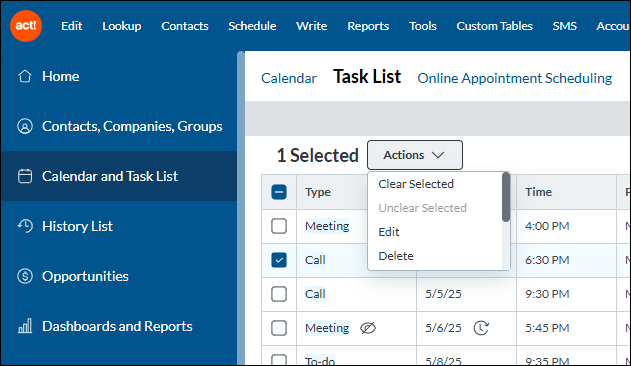
- Combined Date & Recurring into one column
- Combined Activity Type & Private into one column
- Moved Search and Filter controls to the right side of the Task List view
- Multiselect functionality and Actions menu (selected activities can now be cleared and uncleared from the Actions menu)
Bug Fixes
- Fixes for Email/Calendar Integration:
- Changing an Organizer, while connected to your email provider, will no longer cause duplicate meetings for any of the invitees.
- Accounts with multiple users connected to Google or Outlook email providers will no longer see errant duplication of their activities.
- Fixed several causes for errant duplication of activities.
- Fixed several causes for Emails to not attach correctly as History to Contacts and users.
- Fixed several issues with the new Today button in custom Date picker fields
-
SKY-2793: [Contacts] | The "Duplicate" modal reappears when the user changes the "Timezone" after clicking the "Cancel" button on the "Duplicate" modal
-
SKY-4076: [History List] The "Start/End Date" filters are overlapped with "Record Manager" filter when the user clicks on "Custom" Date Filter in the filter drawer for the resolution 1366×768 px
-
SKY-4317: [Outlook Sidebar] Changes made to the Title field in the Outlook sidebar are not reflected in the contact within the application
-
SKY-4609: [Task List] - Cleared activities do not show as Greyed Out depending on preference
-
SKY-4668: [Contacts] An unwanted icon is displayed beside the Opportunity Name header in the Opportunity tab of the Contact detail view
-
SKY-4673: 25_18 The universal search contact button brings up full lookup
-
SKY-4741: [Companies/Groups] Sorting the Opportunities by clicking column header displays "No records to display" in Opportunities tab
-
SKY-4772: [Contacts/Companies/Groups] The sort order defaults to the “Opportunity Name” column in the “Opportunities” tab
-
SKY-4787: AMA campaigns do not send if Birth date field type changed from annual event
-
SKY-4824: [Contacts] Lookup drawer times out after clicking the Lookup button in the menu listing
-
SKY-4847: [Contacts] The column is visible in the grid even when the user deletes it from Define fields and Design layout
-
SKY-4937: Regression: [Opportunities] The "Create new" button is unresponsive on the Opportunities page
-
SKY-4939: Regression: [Non-Entities Pages] The "Opportunity" option in the "Create new" dropdown is unresponsive on Non-Entities pages
-
SKY-4950: Regression - [Contacts] Clicking the "Clear" and "Apply" buttons multiple times in the "Filter" drawer causes the application to log out
-
SKY-4962: Regression: [Opportunities] The Stage dropdown appears blank after opening it when any option other than “All” is selected in the Process dropdown within the filter drawer
-
SKY-4973: Regression - [Opportunities] "Back to all Opportunities" is not working
-
SKY-4993: Regression: [Contacts] The "(blank)" hyperlink text is not displayed in the "List View" for a Contact with no Contact name
-
IN-1195: [Activities] User is logged out when adding a new record in a new activity type which does not contain any record in the 'Title' picklist
-
IN-1309: Edit calendar options available for user who can't edit activity
-
IN-1350: Emails sent from Outlook installed client attach to user history instead of contact history
-
IN-1380: The new "Today" button in the date picker does not show if the field is in a tab instead of the main business card section
-
IN-1382: The new "Today" button in the date picker does not jump to the correct date based on the timezone
-
IN-1404: Make the AI summary respect user's time zone regarding historical event time
-
IN-1424: Intermittent - AppCues fails to load the scripts
-
IN-1421: Issues related to Export on Contact List
-
IN-1422: [AI History] The Summarized AI History panel remains open after generating AI history and then creating a lookup
-
IN-1423: [AI History] The application becomes unresponsive after summarizing history and updating the filter
-
IN-1426: [Tools] The “AI features” checkbox is unchecked in the "Admin Preferences" modal
-
IN-1427: [AI History] The continuous loader appears on the AI History drawer when the ‘Summarize History’ button on the Contacts page (History tab) is double-clicked
-
IN-1428: [AI History] The "AI Features" checkbox remains visible for a Standard-tier account in the Admin Preferences modal
-
IN-1430: [AI History] Page becomes unresponsive when the user generates an AI history and then creates a new entity other than Contact
-
IN-1431: [AI History] The AI History panel closes whenever the user navigates to Personal Info, Contact Access, User Fields, or any other custom tab
-
IN-1438: [AI History] History summarization is attempted for users with attached documents and no histories
-
IN-1463: [Mail Merge] A continuous loader is displayed on the Mail Merge screen after performing a “Current Contact” email merge.
🔗 Act! Premium Cloud Release Notes
The above resource will be regularly updated as new improvements are rolled out, so feel free to bookmark it for future reference.












