









































































































What Act!’s Storage Policy Means for Your Business
If you use Act! Premium Cloud or Act! Advantage, it’s important to understand how storage limits work—and more importantly, how Act! is enforcing an existing storage policy moving forward. This post breaks down what’s changing, what’s not, and what you can do to stay in control of your costs.
The good news: there are no surprises if you plan ahead, and new or returning customers get a full year to optimize their database before any overage fees apply.
Why Storage Limits Exist
Act! Cloud subscriptions include a defined amount of secure cloud storage on Amazon Web Services (AWS) to support optimal performance, backups, and compliance. Over time, databases can grow due to:
- Large file attachments (PDFs, images, proposals, etc.) stored as Documents or Histories
- Email Histories stored as MSG files that contain attachments or images
- Inactive or duplicate records
- Notes and email history accumulated over years
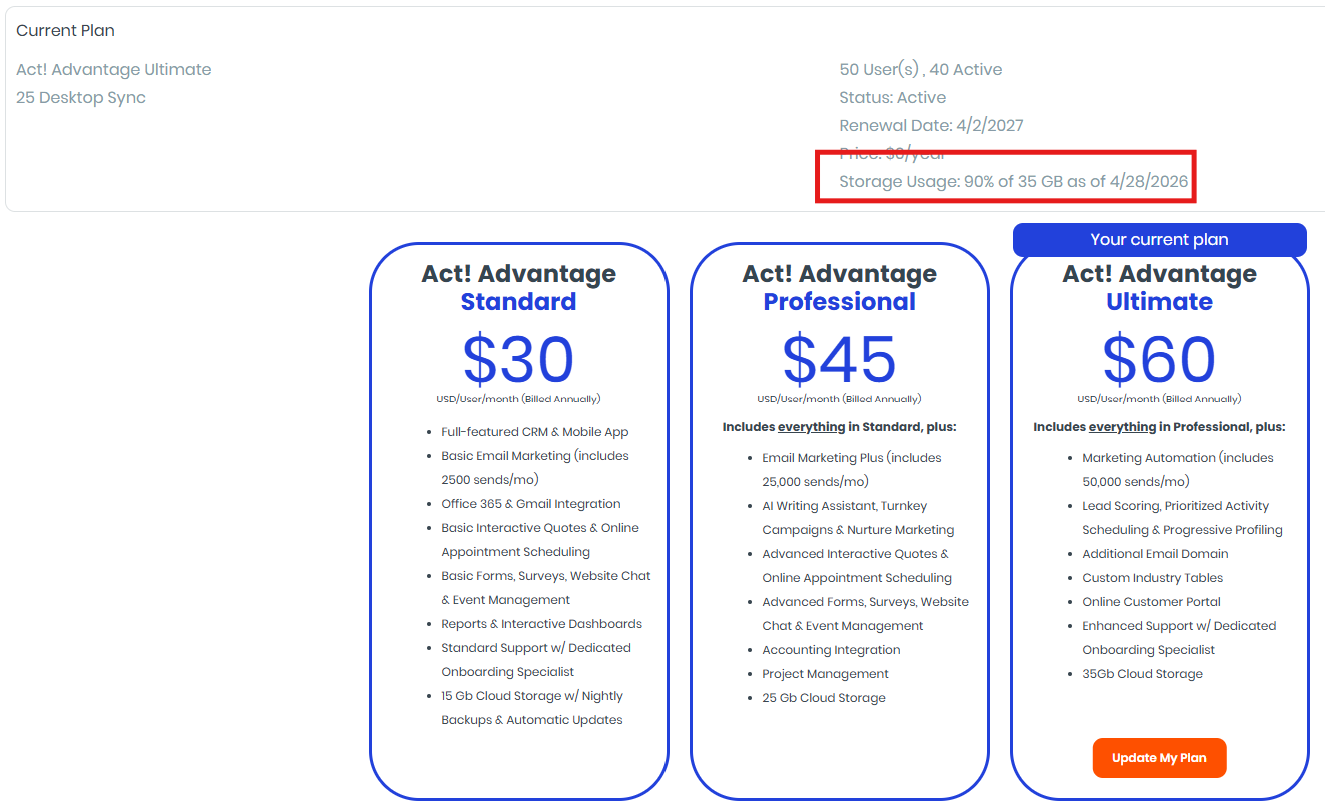 The Act! Cloud storage policy offers highly competitive rates and ensures fair use and system reliability for all customers.
Included Storage by Act! Subscription Type
Each Act! subscription includes a generous base level of storage:
- Act! Premium Cloud or Act! Advantage Standard: 15 GB included
- Act! Advantage Professional: 25 GB included
- Act! Advantage Ultimate: 35 GB included
If your database stays within these limits, no additional charges apply.
How Storage Overages Are Billed (If Needed)
If an account exceeds its included storage, Act! bills overages in 5 GB blocks, with discounted pricing at higher usage levels:
- 1–5 blocks: $48 per block (annually)
- 6–10 blocks: $36 per block (annually)
- 11+ blocks: $24 per block (annually)
Overage charges are prorated, meaning if you exceed your limit mid‑term, you’re only billed for the portion of time you were over. This gives you flexibility—and time—to reduce usage before renewal.
Important Policy Enforcement Update (Customer‑Friendly!)
Here’s the most important part: All new and returning customers will NOT be charged storage overages during their first year. This policy exists specifically to:
- Give customers 12 months to review and clean up their data
- Avoid unexpected charges at renewal
- Encourage smarter data management practices
Overage fees only apply at the first renewal if storage usage remains above the included limit. Think of this as a grace year, not a penalty.
How to Check Your Current Storage Usage
Monitoring your usage is easy and takes less than a minute:
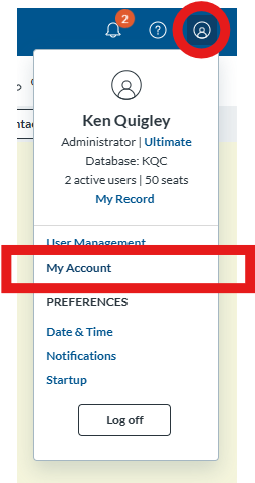
- Log in to my.act.com
- Click the account icon in the top‑right corner
- Select “My Account” from the drop‑down menu
- View your current storage usage
Checking periodically—especially before renewal—can help you avoid unnecessary costs.
Tips to Reduce Storage Usage
If your database is approaching the limit, here are some common ways to reclaim space:
 Remove extra databases. Sometimes customers post an archive of their production database, which isn't needed over time.
- Remove orphaned attachments with our utility, or with this simple trick. Create an RDB from the master database, and then convert that RDB into the master. Act! only includes linked attachments when creating sync databases, so this trick can easily strip out all the dead weight.
- Remove outdated or duplicate attachments
- Store large files externally (SharePoint, OneDrive, Google Drive) and save links in Act! (this may require an add-on.)
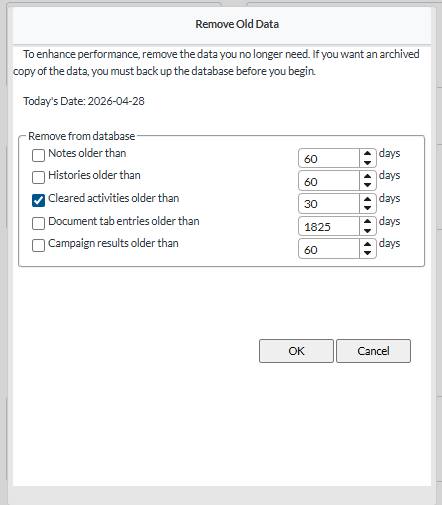
- Use the "Remove Old Data" utility inside APC to clean up old notes, histories, documents, campaign results, and cleared activities that no longer provide value to your business. (see image to the right).
As your Act! reseller, we're happy to help you review your database and identify quick wins for reducing storage—often without losing any important information. In fact, several customers this morning reduced their storage costs by 50-70% simply by removing extra databases. Please note you may not see the results right away, as the https://myaccount.act.com/billing page refreshes once a week (on a Sunday evening), so by Monday they will see the new storage amount.
Please note, we offer Orange Care customers free service to reduce wasted space in their database.
Final Thoughts
This isn’t a new charge—it’s the enforcement of an existing policy, applied thoughtfully and fairly. With clear limits, prorated billing, discounted overages, and a full year before any charges apply, customers have complete control over their storage and costs.
If you have questions about your storage usage or options, feel free to reach out. We'll review your options, run the numbers with alternative plans, and discuss the best path forward. Proactive planning now can save money and improve performance later.













