









































































































When you send an email campaign, one of the most frustrating things you can encounter is a bounce. It’s the digital equivalent of your message being returned to sender. A customer recently asked me how to look up all bounces in her database (see description below), but I had to warn her that it might return too many false positives. Why? Because there are two kinds of bounces - hard and soft—and it's crucial to distinguish between the two when maintaining the health & hygiene of your email list. Simply eliminating all contacts with any bounces will quickly and harshly deplete your distribution - and needlessly so.
 How to find Act! contacts whose emails have bounced
To find email bounces in Act!, start by creating a new group and opening the Add/Remove Contacts option. Click the Edit Criteria button to access the Advanced Query screen. From there, change the left-hand dropdown from Contacts to Campaign Results. Next, set the criteria by selecting Bounces as the field, Equal To as the operator, and True as the value. Save the group, and it will automatically populate with all contacts whose emails have ever bounced in an AMA campaign.
Keep in mind that these results include both hard and soft bounces, which are very different: hard bounces typically indicate invalid email addresses. In contrast, soft bounces usually indicate temporary issues, such as a full inbox or server problems. We've added a more detailed breakdown of the differences below.
 Hard Bounces: Permanent Failures
A hard bounce means your email will never reach its destination. Common reasons include:
- The email address doesn’t exist or is disabled (due to typos, fake signups, or outdated contacts).
- The domain is invalid or no longer active.
- The recipient’s server has blocked you entirely due to a poor reputation, blacklisting, or suspected spam activity.
Hard bounces are a clear signal: remove these addresses from your list immediately. Continuing to send to them damages your sender reputation and increases the risk of being flagged as spam. You can also risk your AMA account, as persistent bounce rates of 5% or higher can lead to account suspension or termination.
Soft Bounces: Temporary Roadblocks

A soft bounce is different—it’s a temporary issue. Your email might still get delivered later. Causes include:
- Recipient’s mailbox: The recipient’s inbox is full.
- Outage: Their mail server is temporarily down for maintenance or technical issues
- Message size: Your message is too large for their system.
- Grey listing or temporary rejections. Some servers will reject emails from unknown senders for the first time.
- Throttling: If too many emails are sent to the same domain in a short period, the server may temporarily block delivery.
- Authentication or configuration issues: Misconfigured or missing SPF, DKIM, or DMARC records can sometimes cause temporary rejections until the sender’s domain is properly authenticated
Most email systems will retry sending a soft bounce for a short period. If the problem persists, it may eventually be treated as a hard bounce.
Why Bounce Data Can Mislead You
While it’s tempting to use bounce feedback as your sole guide for who to email and who to avoid, bounce data only tells part of the story.
- A soft bounce doesn’t mean the address is bad—it may just be a temporary hiccup.
- A lack of bounces doesn’t guarantee the email is valid either—some invalid addresses don’t bounce right away.
- Bounce codes can be inconsistent across different mail servers, making interpretation tricky.
Relying solely on bounce data can cause you to mistakenly drop good contacts or keep bad ones.
The Reliable Solution: Email Verification
If you want a clear picture of your list’s health, performing a separate email verification is the only reliable way. Verification tools, which are integrated within Act! Advantage, check whether an address is "valid", "invalid", "unknown", or "accept all", to determine if the address is safe to send to—without relying on bounce feedback.
By combining bounce monitoring with verification, you can:
- Protect your sender reputation.
- Reduce wasted sends.
- Improve overall deliverability.
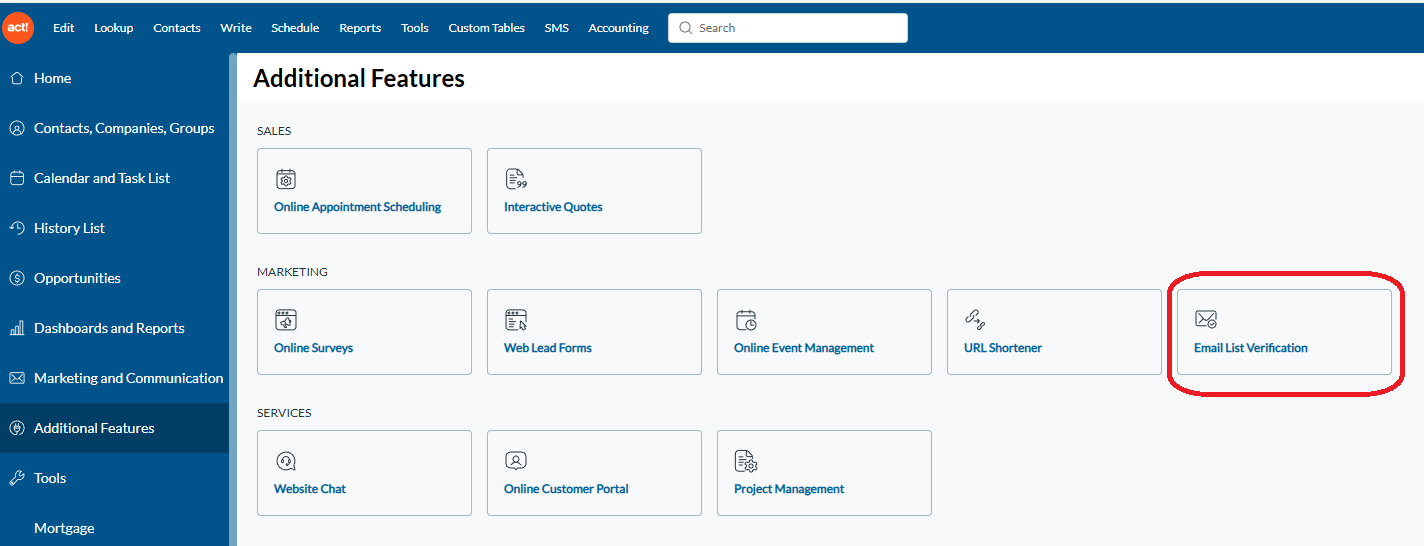
To access the Email List Verification feature in Act! Advantage, simply click Additional Features from the leftside Navbar, and then the "Email List Verification" button in the middle row. If you do not see it, the administrator has assigned this permission to another user (it's only available to one user at a time). This feature allows you to verify all contacts within a selected group, at a rate of 2-3 contacts per second.
Final Takeaway
Bounce data is useful, but it’s not the whole truth. Think of it as a warning light on your dashboard—it tells you something’s wrong, but not always why. To accurately assess a contact’s deliverability, you need to look beyond bounces and invest in proper email verification, which is conveniently included with Act! Advantage.
Additionally, the Keystroke Campaign Dashboard (KCD) has recently been enhanced to help users more effectively distinguish between hard and soft bounces. By filtering based on bounce frequency, KCD makes it easier to identify problematic addresses. Generally, an address with a higher bounce count is more likely to be a hard bounce. These should be removed from your campaigns permanently to protect both your sender reputation and your AMA account.
KCD is available at no cost to Keystroke customers with Orange Care. It delivers industry-leading AMA campaign insights and allows you to quickly identify your most engaged contacts, ensuring your marketing efforts remain focused and effective.
Getting started is simple: visit www.Day-Minder.com, create an account, and generate your team’s KCD license today.












