









































































































Act! has rolled out a smart new enhancement to its email marketing platform—one that makes your outreach more seamless, more personalized, and far easier for your recipients. This update will significantly transform how you send invitations to events, surveys, or web forms.
A Smoother Experience for Your Recipients
The new feature allows you to send email invitations that include personalized links for each recipient. When someone clicks the link, their contact information automatically prepopulates into the event registration, survey, or web form.
That means fewer fields for them to fill out, less friction, and a much higher likelihood that they’ll complete the form. When people save time, they’re more inclined to follow through—and this enhancement does exactly that.
Accurate Data, Every Time
Beyond convenience, this feature also ensures cleaner, more accurate data. The personalized link requires the recipient to use the same email address that was used to send the invitation, enabling Act! to automatically associate their responses with the correct contact record.
This means no mismatched entries. No duplicates. No guessing.
Just clean, reliable data flowing directly into your CRM.
And Yes… It Looks Pretty Cool
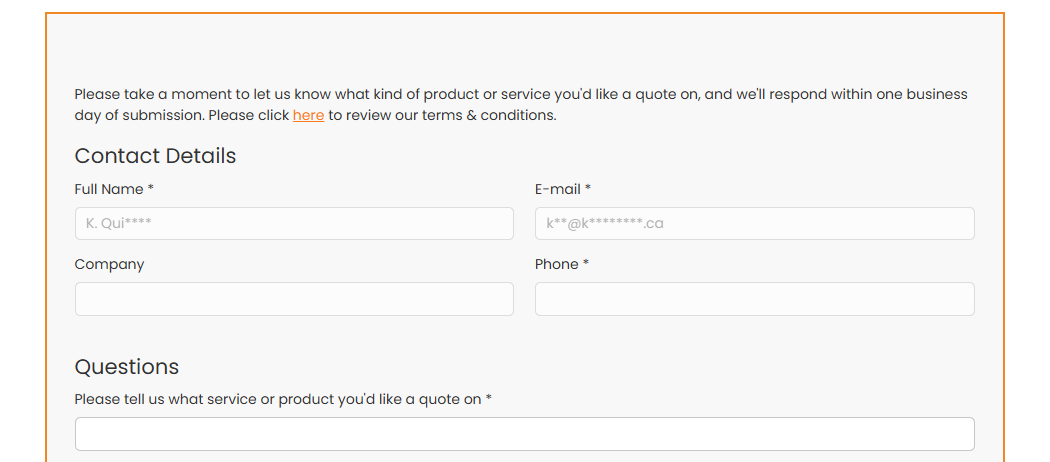
Personalized links feel modern and polished. Your recipients get a smooth, professional experience that reflects well on your brand. The following image shows how their contact information prepopulates into the form.
Please note that only the contact name and email address data are displayed, with this field data hashed for security reasons.
How It Works
Act! introduced a new merge field called “ID”, which allows you to build a custom hyperlink by combining:
- The URL of your web form, survey, or event
- The string "?contactID="
- The merge field {CONTACT.ID}
When these three values are concatenated together, it creates a unique, trackable link for every contact.
Adding a Personalized Link to Your Email
It only takes a moment:
- In your email template, type a hyperlink phrase such as “CLICK HERE”.
- Highlight the text and click the Hyperlink button in the toolbar.
- In the URL field, enter:
<URL>?ContactID={CONTACT.ID} - Click Save, then Return.
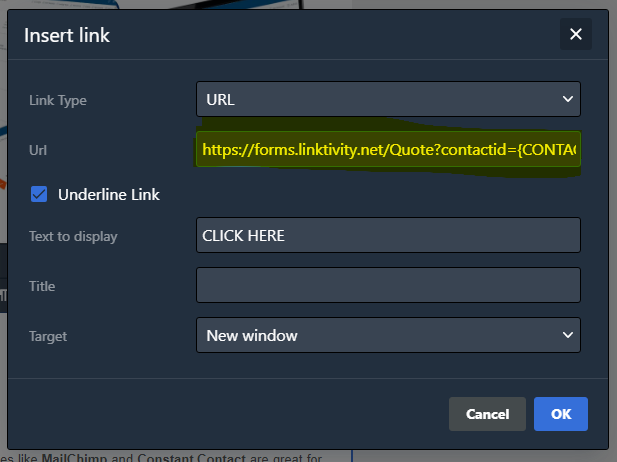
Your template is now ready to use in any campaign. When the email is sent, Act! automatically converts that hyperlink into a personalized link for each recipient.
One More Reason to Love Act! Email Marketing
This enhancement blends convenience, accuracy, and personalization—three things every marketer wants more of. Whether you're gathering feedback, registering attendees, or collecting form submissions, Act!’s new personalized link feature helps you get better results with less effort.
This small change can have a significant impact. And just one more advantage of using Act! email marketing to power your outreach.












