








































































































Act! Premium Desktop v27.1 introduces a collection of productivity enhancements designed to help you streamline everyday workflows, reduce manual effort, and improve data quality across your CRM. Whether you’re managing activities, maintaining your database, or handling system administration tasks, v27.1 helps you work more efficiently inside the tools you already use every day.
- Learn more about Act! v27.1 with a video feature tour HERE
- Please note: These enhancements are available exclusively to Act! Premium desktop subscribers. These features are not available in Act! Premium for Web or Act! Premium Cloud
Activity Reassigner
The Activity Reassigner allows you to select and reassign multiple activities in a single action instead of updating them one at a time. This significantly reduces the time spent managing tasks and makes it easier to rebalance workloads across teams.
- Quickly reassign ownership of multiple activities at once.
- Shift work between users without editing activities individually.
- Keep work moving without disruption to everyday workflows.
No Associated Contacts
The No Associated Contacts utility identifies Companies, Groups, or Opportunities that do not have any linked Contacts. This makes it easy to clean up unused records, improving database organization and overall usability.
- Quickly identify Companies, Groups, and Opportunities without linked Contacts.
- Remove clutter and reduce unused or incomplete records.
- Maintain a cleaner, more organized database.
Opp History
Opp History automatically creates a corresponding Contact history when a history is added to an Opportunity. This eliminates duplicate data entry and ensures a complete, consistent view of customer interactions across your records.
- Automatically sync Opportunity history to related Contacts.
- Eliminate the need to log the same history in two places.
- Get a more unified view of customer engagement in one place.
SQL Manager
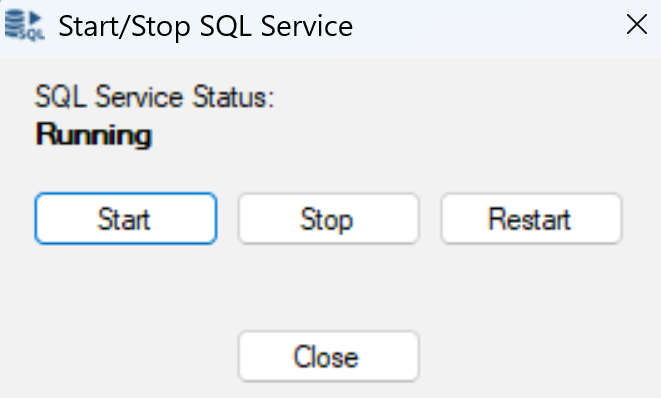
SQL Manager allows you to start and stop SQL services directly within Act! This removes the need to navigate outside the application, simplifying system administration and saving users time.
- Start and stop SQL services without leaving Act!.
- Simplify common database administration tasks.
- Reduce time spent switching between tools.
Supporting Enhancements
Act! Premium Desktop v27.1 also includes a number of supporting improvements that enhance everyday usability and data accuracy:
- Primary Contact Plus improves duplicate checking for primary contacts, helping prevent issues before they impact your workflows.
- Faster navigation response times and improved Outlook Sidebar reliability reduce slowdowns, crashes, and interruptions during everyday work — whether you're updating records in Act! or managing communication alongside your inbox.
Together, these updates improve data accuracy, navigation responsiveness, and Outlook Sidebar reliability, delivering a smoother overall experience.
Upgrade to Act! Premium Desktop v27.1 today and start saving time across every part of your workflow.
Noteworthy Issues Addressed:
- Update welcome page links to be dynamic version
- Act! Sidebar for Outlook bug fixes (also applies to APFW)
- Fixed an issue in Act! Sidebar for Outlook, where changes made to the Title field in the Outlook sidebar were not reflected in the contact within the application
- Fixed another Act! Sidebar for Outlook issue where Outlook add-in was getting disabled by Outlook frequently
- Fixed navigation to opportunity details from pipeline view
- Fixed issue with AMA template editor where the screen width was truncated
- Fixed issue when "File > Save Copy As" doesn't work in SQL 2025
Downloads:
Please note that this is not a schema-breaking update, so Act! workgroups can upgrade some or all of their workstations and continue working in a mixed environment.













