All Act! Users at one time or another have launched Act! only to discover nothing will work because SQL isn’t running. In recent years Act! learned to notify users of the issue with a pop-up, but this still left users to figure out how to solve the issue.
The most common method for fixing this was from the Windows Services Console, and required users to follow these steps”
- On your keyboard, press the Windows Key + R
- In the Run dialog, type services.msc, then press Enter or click OK
- Type “S” to advance to the services starting with that letter, and select SQL Server (ACT7)
- Right-click on SQL Server (ACT7), and select Start
- Click OK
To the less tech savvy user, this is a daunting process, so we’re pleased to offer a simpler solution.
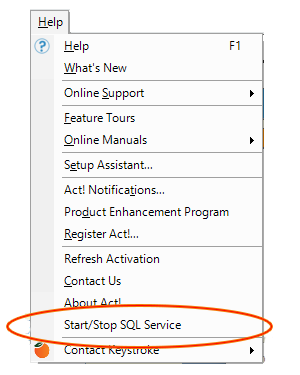
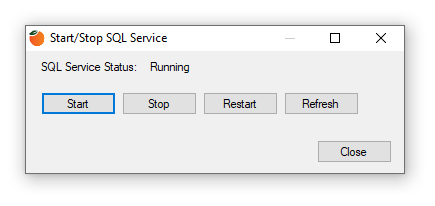
The SQL Manager is a new feature within the Keystroke Welcome Kit that puts these controls right where you need them – inside of Act!. Conveniently located under the Act! Help menu, the SQL Manager features Stop/Start controls allows users to easily manage this critical service without ever having to leave the application.