AutoLimited Access
Automatically set your contact, company or group limited access rules on the fly with AutoLimitedAccess.
AutoLimitedAccess allows you to define sets of rules, so that as contacts, companies, or groups are created/updated, limited access is automatically set. You can select any combination of users and teams, users only or teams only.
Please note that Act! Pro does not support Limited Access, and is not supported for use with ALA.
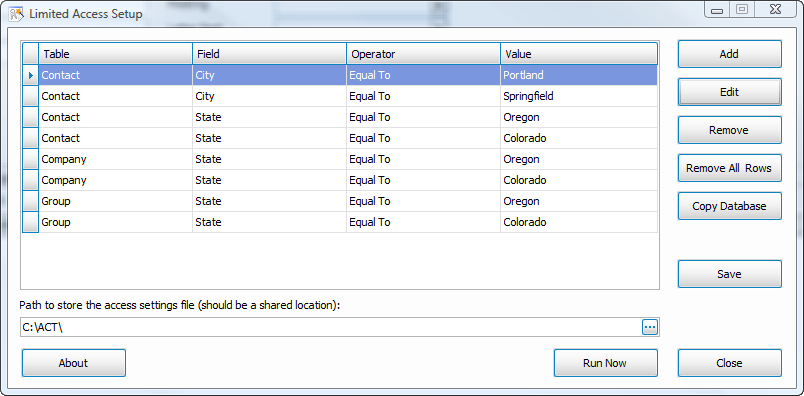
The below image shows an overall view of the rules you have defined for the current database.
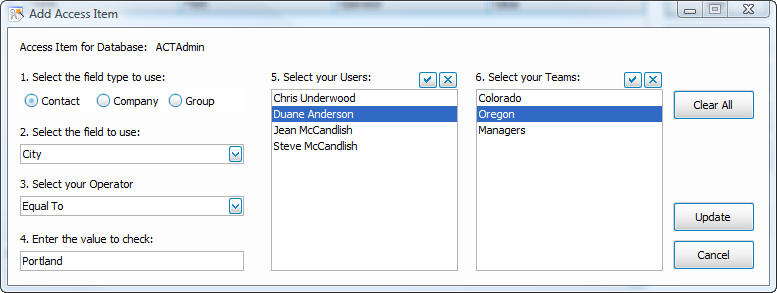
The next image below shows one of the defined rules. In this case, City is Equal To "Portland" and is assigned to a specific user and the Oregon team.
When new rules are defined, you should then use the "Run Now" option. Run Now will scan the entire database, or a lookup and set access if needed. The Professional version allows Territory Realignment, as seen below. In addition, the Professional version allows for command-line control.

Annual Maintenance: Your first year of software maintenance is included in your original license price. This gives you program updates throughout your first year as new versions of Act! are released. After the first year, you will be contacted annually to renew your maintenance (50% of the current list price per license).
Maintenance renewal is recommended, but not mandatory. If you let your maintenance lapse, the program will still work as is, but you will not be able to upgrade your Act!, apply any updates, or receive any phone or email support. As maintenance plans are only available to current subscribers, expired users will need to pay the current list price to upgrade and reinstate their maintenance/support.
Support includes assistance with troubleshooting. It does not include installation and configuration, which is available as part of our Orange Care and VIP plans sold separately.



















































































































